Programming2021-06-141 min read
Tạo layout trong NextJS
Layout là một cái khung để chứa các component trong app
Nguyen Pham
•Xin chào. Mình thích lập trình và công nghệ. Đây là blog mình chia sẻ lại các kiến thức về lập trình, công nghệ.
Layout trong NextJS
- Layout là một cái khung để chứa các component trong app
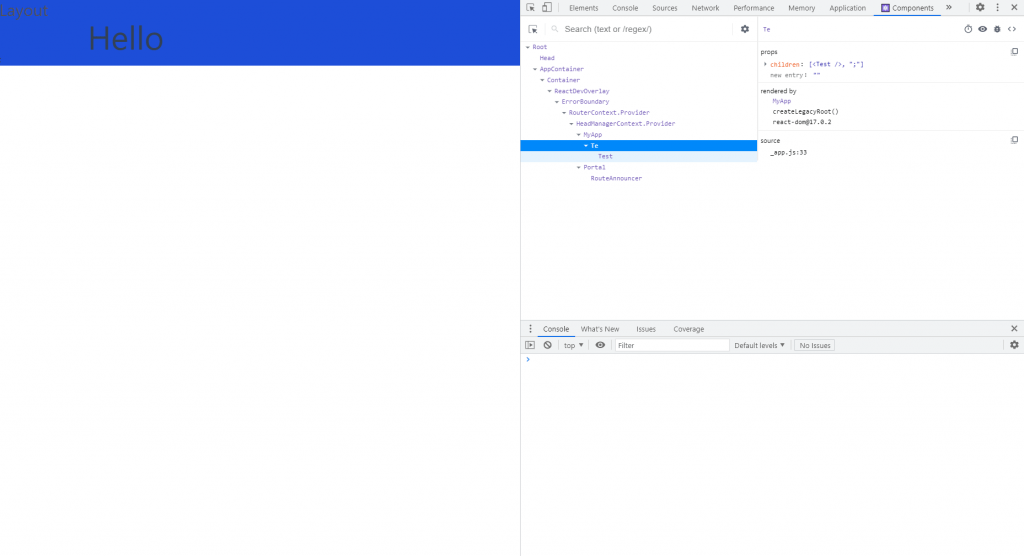
Bắt đầu nào 😉
_app.js
codefunction MyApp({ Component, pageProps }) { const Layout = Component.Layout || (({ children }) => <>{children}</>); return ( <Layout> <Component {...pageProps} />; </Layout> ); } export default MyApp;
components/[layoutxxx].js
codeexport default function Te({ children }) { return ( <div className="bg-blue-700"> <h1 className="text-3xl text-gray-600">Layout</h1> <div>{children}</div> </div> ); }
page/[pagexxxx].js
codeimport Te from "components/layouts/Te.js"; function Test() { return ( <> <h1 className="text-6xl ml-40 relative ">Hello</h1> </> ); } Test.Layout = Te; export default Test; // layout for page
Chú ý#
thư mục layout phải ở trong folder component. Nếu đang sử dụng Tailwind CSS (Vẫn có thể để chỗ khác những phải tuỳ chỉnh lại config)
Restart lại server nếu Layout không hiện
Tham khảo#
Tags:#Programming