Tạo ứng dụng pomodoro trong NextJS
Giới thiệu Pomodoro là một phương pháp học tập mà chúng ta sẽ tập trung học trong 25 phút sau đó sẽ có một khoảng nghỉ là 5 phút. Chúng ta sẽ tạo một app pomodo
Giới thiệu#
Pomodoro là một phương pháp học tập mà chúng ta sẽ tập trung học trong 25 phút sau đó sẽ có một khoảng nghỉ là 5 phút.
Chúng ta sẽ tạo một app pomodoro để thực hiện việc đếm giờ đó.
Bắt đầu code#
Chúng ta sẽ sử dụng NextJS và TailwindCSS. Để bắt đầu chúng ta có thể clone repo sau:
codegit clone https://github.com/nvni/next-tailwindcss.git pomodoro cd pomodoro yarn install
Để hiểu chi tiết cách cài đặt bạn có thể xem bài viết này: https://2k1.org/su-dung-tailwind-css-trong-nextjs/1276/2021/
Bắt đầu code với file index.js
codeimport { useEffect, useState } from "react"; import Head from "next/head"; const timeType = { pomodoro: { time: 25 * 60, stopmessage: "Bạn đã hoàn thành pomodoro 🍅" }, sbreak: { time: 5 * 60, stopmessage: "Bạn đã hết thời gian nghỉ bắt đầu làm việc thôi nào 😊", }, lbreak: { time: 15 * 60, stopmessage: "Bạn đã hết thời gian nghỉ bắt đầu làm việc thôi nào 😉", }, }; function pomodoro() { const [time, setTime] = useState(25 * 60); const [active, setActive] = useState(false); const [inter, setInter] = useState(); const [type, setType] = useState("pomodoro"); const [currentTime, setCurrentTime] = useState(); // Change type useEffect(() => { timeReset(); }, [type]); // Send notification useEffect(async () => { console.log("time :>> ", time); if (time === 0) { if (Notification.permission == "granted") { navigator.serviceWorker.getRegistration().then(function (reg) { reg.showNotification(timeType[type].stopmessage); }); } clearInterval(inter); } }, [time]); // Active time useEffect(() => { if (active) { setInter( setInterval(() => { setTime( Math.floor( timeType[type].time - (new Date().getTime() - currentTime) / 1000 ) ); console.log( "((new Date().getTime()) - currentTime) :>> ", Math.floor( timeType[type].time - (new Date().getTime() - currentTime) / 1000 ) ); }, 100) ); } return () => { clearInterval(inter); }; }, [active]); function timeStart() { setCurrentTime(new Date().getTime()); if (Notification.permission != "granted") { alert("You need turn on Notification"); Notification.requestPermission(function (status) { console.log("Notification permission status:", status); }); } setActive((a) => !a); } function timeStop() { clearInterval(inter); setActive(false); } // resetTime function timeReset() { clearInterval(inter); setActive(false); setTime(timeType[type].time); } return ( <div> <Head> <title>{type}</title> {type == "pomodoro" && ( <link rel="icon" href="/1.svg" type="image/svg" sizes="16x16" /> )} {type == "sbreak" && ( <link rel="icon" href="/2.svg" type="image/svg" sizes="16x16" /> )} {type == "lbreak" && ( <link rel="icon" href="/3.svg" type="image/svg" sizes="16x16" /> )} </Head> <div className="flex h-screen w-screen bg-gray-700 justify-center items-center"> <div className="flex flex-col w-full min-w-md md:w-1/2 h-4/5 bg-white rounded-lg"> <div className="flex flex-row w-full justify-between p-5 space-x-2"> <div onClick={() => { setType("pomodoro"); }} className={`flex-1 text-center text-xl border rounded-lg hover:bg-red-300 p-1 ${ type == "pomodoro" && "bg-red-300" }`} > Pomodoro </div> <div onClick={() => { setType("sbreak"); }} className={`flex-1 text-center text-xl border rounded-lg hover:bg-green-300 p-1 ${ type == "sbreak" && "bg-green-300" }`} > Nghỉ </div> <div onClick={() => { setType("lbreak"); }} className={`flex-1 text-center text-xl border rounded-lg hover:bg-blue-300 p-1 ${ type == "lbreak" && "bg-blue-300" }`} > Nghỉ dài </div> </div> <div className="w-full text-9xl text-center"> {`${parseInt(time / 60) .toString() .padStart(2, "0")} : ${(time % 60).toString().padStart(2, "0")}`} </div> {/* Control button */} <div className="w-full text-9xl text-center space-x-4"> <button className="text-5xl p-5 rounded-lg border border-blue-400 hover:bg-blue-400 hover:text-white focus:outline-none" style={active ? { display: "none" } : { display: "initial" }} onClick={timeStart} > Start </button> <button className="text-5xl p-5 rounded-lg border border-yellow-400 hover:bg-yellow-400 hover:text-white focus:outline-none" style={active ? { display: "initial" } : { display: "none" }} onClick={timeStop} > Stop </button> <button className="text-5xl p-5 rounded-lg border border-red-400 hover:bg-red-400 hover:text-white focus:outline-none" onClick={timeReset} > Reset </button> </div> </div> </div> </div> ); } export default pomodoro;
Một vài vấn đề cần lưu ý:#
Các hàm setState là không đồng bộ
tham khảo https://medium.com/@baphemot/understanding-reactjs-setstate-a4640451865b
Muốn cập nhật dữ liệu state từ state cũ ta cần làm setState(prevState => prevState+1) Điều này là bắt buộc.
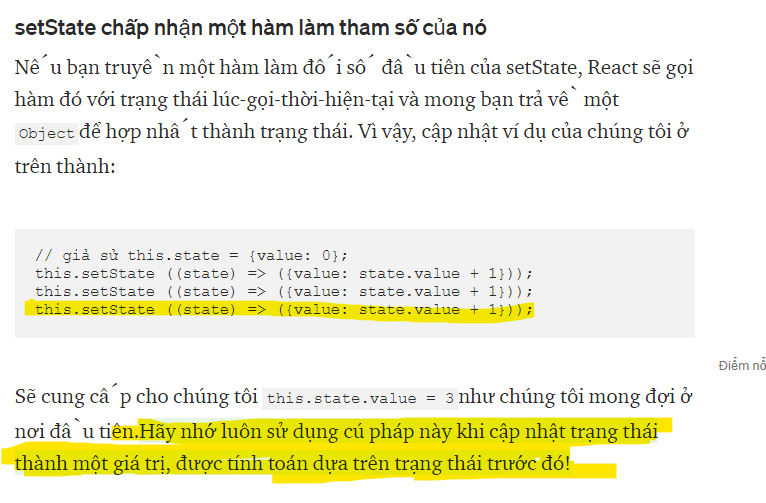
do vậy khi ta muốn một state thay đổi và lấy gia trị của state thì cần cho vào hàm useEffect(()=>{} , [state])
Hiểu về cleanup effect:
Tài liệu: https://vi.reactjs.org/docs/hooks-effect.html
codeuseEffect(() => { // effect return () => { // clean }; }, []);
Tại sao phải clean:
- Khi ta áp dụng một effect thì effect nó sẽ tồn tại. như chương trình trên thì ta có
setIntervalNếu không clean thì khi gọi effect lần thứ 2 nó vẫn áp dụng tiếp => nó áp dụng 2 lầnsetIntervaldo vậy sau mỗi lần ta cân clean nó đi. - Cách chạy nó như sau:
- lần 1: effect (Khi component mount)
- lần 2: clean effect -> effect
- lần 3: clean effect -> effect
- …..
Một số vấn đề với setInterval
codesetInterval(()=>{ // Code },1000)
setInterval sẽ thực hiện code trong 1s nhưng khi đếm thời gian thì nó bị ảnh hưởng bởi một số hàm khác nên nó sẽ bị đếm thời gian sai: do vậy ở code trên ta sẽ thực hiện update theo thời gian lấy từ hàm Date() khoảng thời gian update là 100ms
Hiển thị notification
https://developers.google.com/web/ilt/pwa/introduction-to-push-notifications
Sử dụng PWA
https://github.com/shadowwalker/next-pwa
- Lưu ý file
manifest,jsoncần đầy thủ thông tin thì mới có thể dùng PWA được
Tham khảo thêm: